Live demo runbook (chain owner)
This runbook gets you from a cold environment to a confident, honest live demo for a school-group (chain) owner. The product is genuinely strong per campus and the demo is absolutely achievable — what makes or breaks it is honest framing plus about a day of provisioning, not missing features. The single rule that runs through every section: never let the demo silently degrade and pretend it didn’t. When something is in Preview or on the roadmap, you say so out loud — the honesty is part of why this deal closes.
Demo on UAT only. Production is currently a hollow shell with no secrets, so it is not a working environment to show.
1. Pre-demo provisioning checklist
Do this the day before, not the morning of. Each item below has a “done when” so you can tick it like a pre-flight.
1.1 Schools and data — build them through the app, never SQL
The whole chain story (cross-school health, onboarding list, channel metering) looks empty and unconvincing with a single school. You need a small fleet.
| Step | What to do | Done when |
|---|---|---|
| Onboard 2–3 UAT campuses | Log in as operator@example.com, open the Operator console, click Onboard school, complete the form per campus, and let the durable workflow finish. Never SQL-seed UAT — build every record through the app’s own flows so the demo mirrors a real rollout. | The Schools in platform card shows 3+ schools and each appears Active in the Schools list. |
| Generate a little real movement | Log in as each new campus’s officer (or the demo officer@example.com on the demo school) and record a handful of check-ins/check-outs so dashboards, attendance, and parent portal have live status to show. | Admin dashboard shows non-zero On-site / Checked in today tiles. |
| Create a guardian portal link to demo | For one learner with a guardian on file, capture the tokenised /p/[token] link so you can open the parent portal cold on a phone. | Opening the link on a phone shows “Hi |
Honest note for yourself: there is no group-scoped owner login yet (Roadmap). On UAT the operator persona sees every school on the platform. To keep the demo clean, make sure the UAT platform contains only the buyer’s schools so “your whole group on one screen” is literally true on screen.
1.2 NFC tap on a real device
Already confirmed on your UAT (2026-06-27): a real NFC badge tap on an Android phone opens the officer decision screen. Re-verify the morning of — Web NFC is Chrome-on-Android over HTTPS only, and on a laptop the gate centrepiece silently turns into typed badge entry, which kills the “tap a badge” moment.
- Bring the physical Android phone with NFC enabled, on Chrome, pointed at the UAT HTTPS URL.
- Have the registered NFC tags/badges that map to real learners on the demo campus.
- Re-run the tap once the morning of — confirm a real tap still lands on the decision screen, not the manual fallback.
- Done when: a physical tap on the phone opens the officer decision screen for the right learner.
1.3 Web push (VAPID) on a real device
Already provisioned and confirmed on your UAT (2026-06-27): VAPID secrets are set and a web push was seen arriving on a real device. Re-verify the morning of so you can hold up a live push with confidence.
- VAPID secrets are already provisioned on the UAT notification-service with the matching gateway key — confirm they’re still in place.
- Install the parent portal to a real phone (Install MySentinel) and confirm a push still arrives on that device.
- Done when: a check-in you trigger produces a push notification you can hold up on the phone.
- Only for a fresh environment without VAPID: demo the channel honesty UI instead and call push Roadmap-for-that-environment plainly. (Not your UAT.)
1.4 Branded PDF / SAR rendering
Already confirmed on your UAT (2026-06-27): branded PDF / POPIA SAR rendering works (the Cloudflare Browser Rendering binding is live). Re-verify the morning of — without the binding, documents render title-only and look broken.
- Confirm the Browser Rendering binding is still present and working on UAT.
- Done when: a generated report/SAR PDF comes out branded (logo + school colours), not a stub.
- Only for a fresh environment without the binding: don’t open a PDF live — describe it and mark it Roadmap-for-that-environment. (Not your UAT.)
1.5 Channels — know what will actually deliver
All four channels are confirmed delivering on your UAT (2026-06-27). Re-verify the morning of. WhatsApp/SMS still switch on per school once that school connects its provider — keep that nuance.
| Channel | UAT state | What to say |
|---|---|---|
| App notification + email | Live | These are the always-on channels. |
| Web push | Live — provisioned + device-confirmed (§1.3) | “Push is live here — confirmed arriving on a real device.” |
| Live, tested on UAT — switches on per school once that school’s provider/Meta templates are connected; demotes to email until then | ”WhatsApp delivers — proven on UAT. Each school connects its own provider to switch it on.” | |
| SMS | Live, tested on UAT — operator-provisioned per school | ”SMS delivers — proven on UAT, operator-provisioned per school.” |
1.6 Last polish pass (so an advisor doesn’t trip on it)
- The report builder still has a free-text “Class ID” box (known crack) — a wrong ID gives an empty/erroring report. Avoid the report builder live, or pre-fill a known-good Class ID and don’t improvise.
- The admin Attendance page is hardcoded English (known crack) — don’t use it as your trilingual proof point; use Settings → default language and the parent portal language switch instead.
1.7 Environment sanity
- Confirm you are on UAT, logged out of any stale sessions, and that the demo accounts work (password
password123). - The login banner reads “Environment: Local. This is not production.” on local; on UAT confirm you are pointed at the UAT URL, not prod.
- Have the demo logins ready:
officer@example.com,admin@example.com,operator@example.com,mrs.naidoo@example.com.
2. The honest framing script
Say these out loud at the right beats. They pre-empt the exact questions a buyer’s technical advisor will ask, and they convert “gap” into “named roadmap.”
| When | Say this (verbatim is fine) |
|---|---|
| Opening, before the operator console | ”What you’re seeing is UAT, our integration environment — production isn’t live yet. Everything here is the real software, real data we built through the app, not mock-ups.” |
| When you show the operator console | ”The operator console today is platform operations — onboarding and health. A group-scoped owner role, where you log in seeing only your own campuses, is on the near roadmap. For this demo the platform contains only your schools, so this is effectively your group view.” |
| When anyone asks about per-school databases / scale | ”We’re shard-ready, single-shard today. Schools are isolated logically by school_id, not yet physically per-campus. The sharding code is real; only shard_0 is live right now.” |
| When WhatsApp comes up | ”WhatsApp delivers — we’ve tested it on UAT. It’s the channel SA parents actually use. Each school connects its own provider to switch it on; until a given school connects, the system honestly demotes to email rather than faking a send.” |
| When push comes up | ”Push is real and confirmed arriving on a real device. It uses per-environment keys, which are set up here.” |
| When audit/compliance comes up | ”The audit trail is append-only, enforced by a database trigger. It’s not a hash-chain/WORM ledger — it’s tamper-evident at the database layer, and it backs our POPIA SAR and erasure flows.” |
| When a consolidated academic report is asked for | ”Today the cross-campus aggregates are channel-usage and billing. A consolidated cross-campus academic report is on the roadmap.” |
| If asked to “see production" | "Production is provisioned but not yet carrying live traffic — it’s intentionally a hollow shell until go-live. UAT is the honest place to evaluate.” |
The meta-move: lead with the honesty. “Here’s exactly what’s live, here’s what’s a provisioning step, here’s what’s roadmap” is more convincing to a serious buyer than a flawless-looking pitch they suspect is airbrushed.
3. The 8-beat storyline (exact click-paths)
Roles and scope: the JWT carries role + scope; school_id is always from the verified token. Demo logins use password password123.
Beat 1 — Open on the operator console as a wall-board
“You run the group from one screen.”
- Log in as
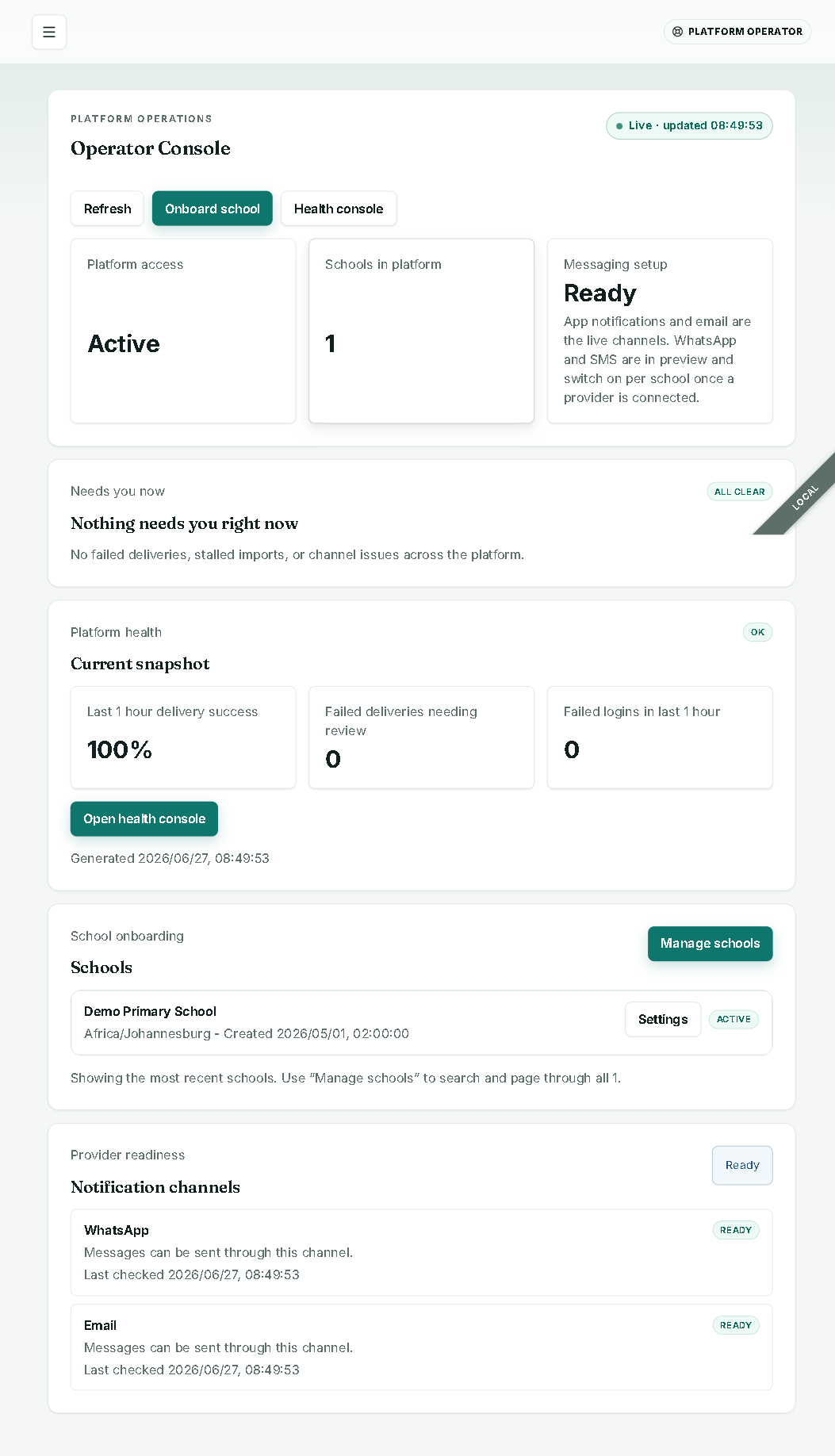
operator@example.com. - You land on Console. Point out the cards: Platform access (Active), Schools in platform (N), Messaging setup (Ready — “App notifications and email are the live channels. WhatsApp and SMS are in preview…”).
- Read the “Needs you now” strip and Platform health (Last 1 hour delivery success %, Failed deliveries needing review, Failed logins).
- Say the framing line from §2 (platform-ops today, group-scoping on roadmap).
Beat 2 — Onboard a brand-new campus live (the killer beat)
“No SQL. No engineer. Minutes. And visibly resilient.”
- From the console, click Onboard school (or go to
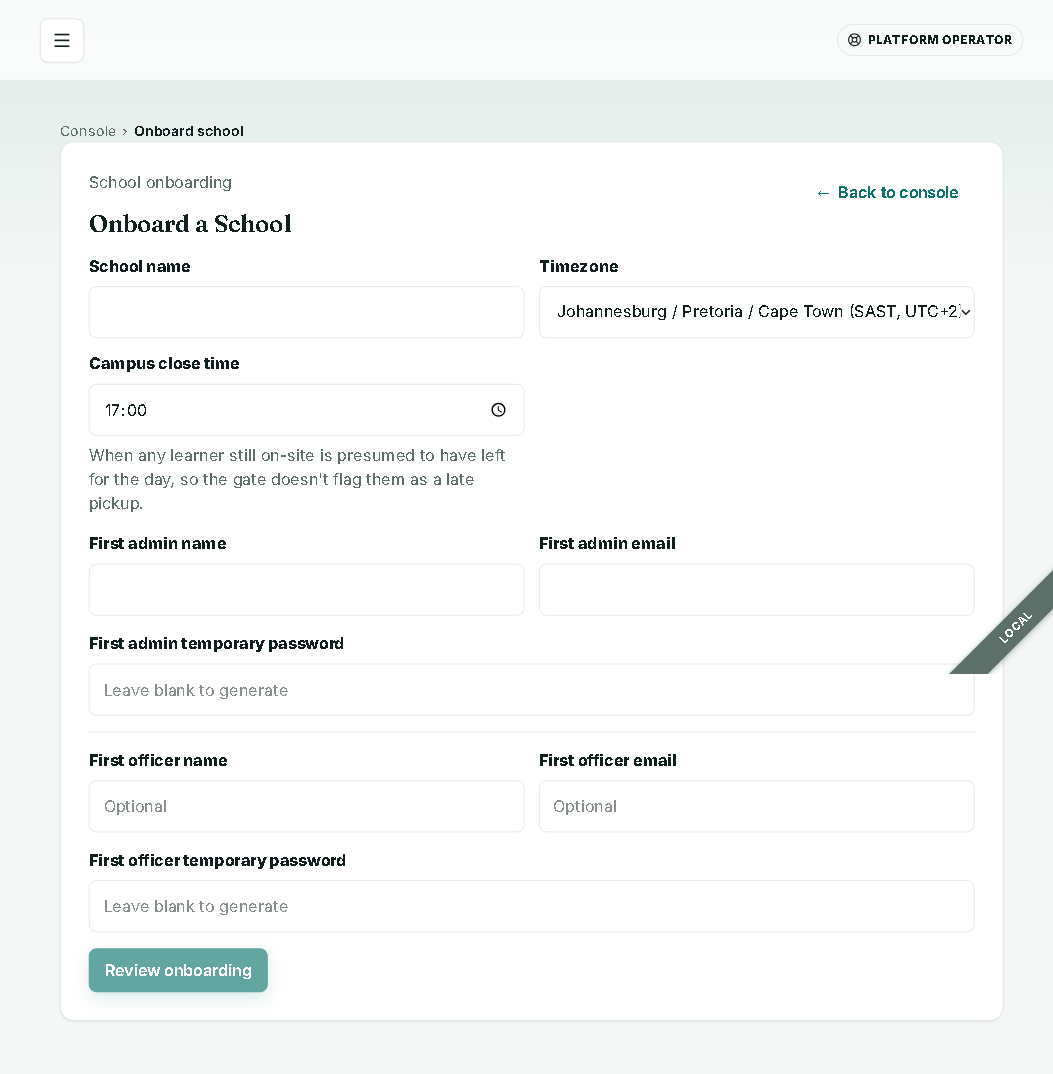
/operator/schools/new). - Fill the form: School name, Timezone (defaults to Johannesburg; show the pan-African + global options), Campus close time, First admin name/email/temp password (leave password blank to generate), optional First officer.
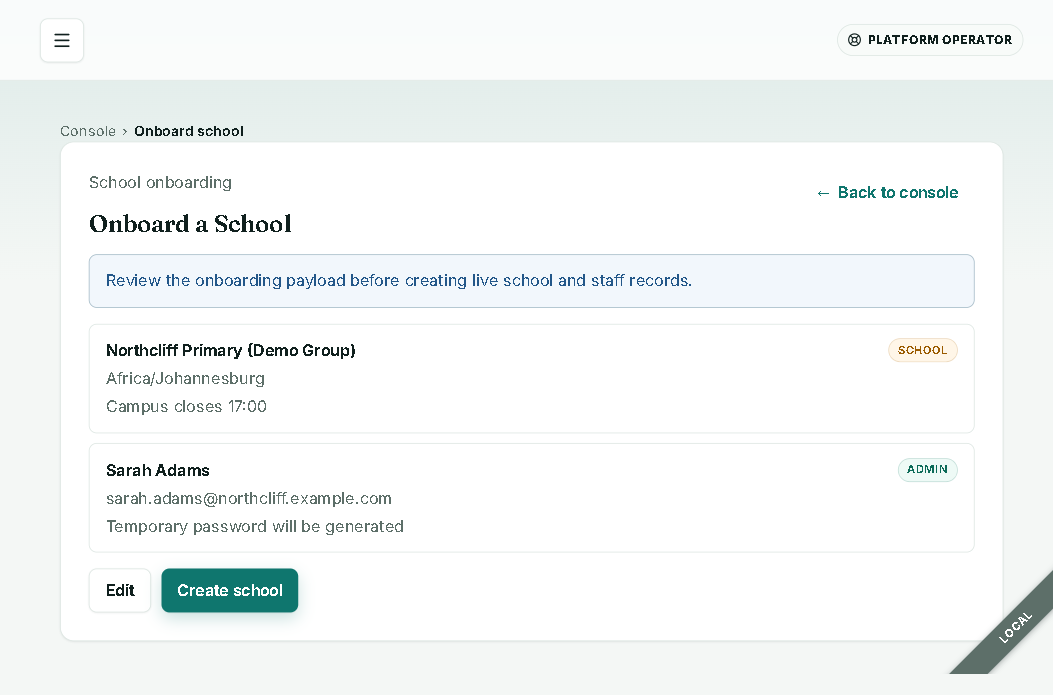
- Click Review onboarding → the review-before-commit panel appears. Read it back.
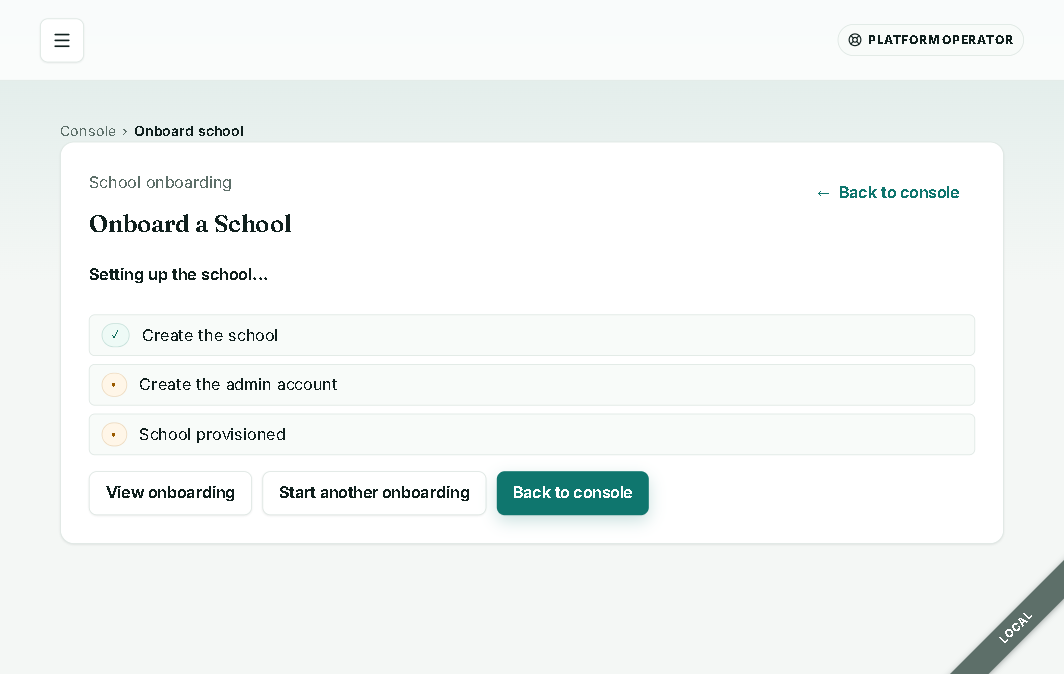
- Click Create school → watch the durable workflow tick steps green live: “Create the school” ✓ → “Create the admin account” → “School provisioned.”
- Click View onboarding (or Start another onboarding). Return to the console and show Schools in platform has incremented.
Beat 3 — Cross-school health
“Where do you need to look first, across every campus?”
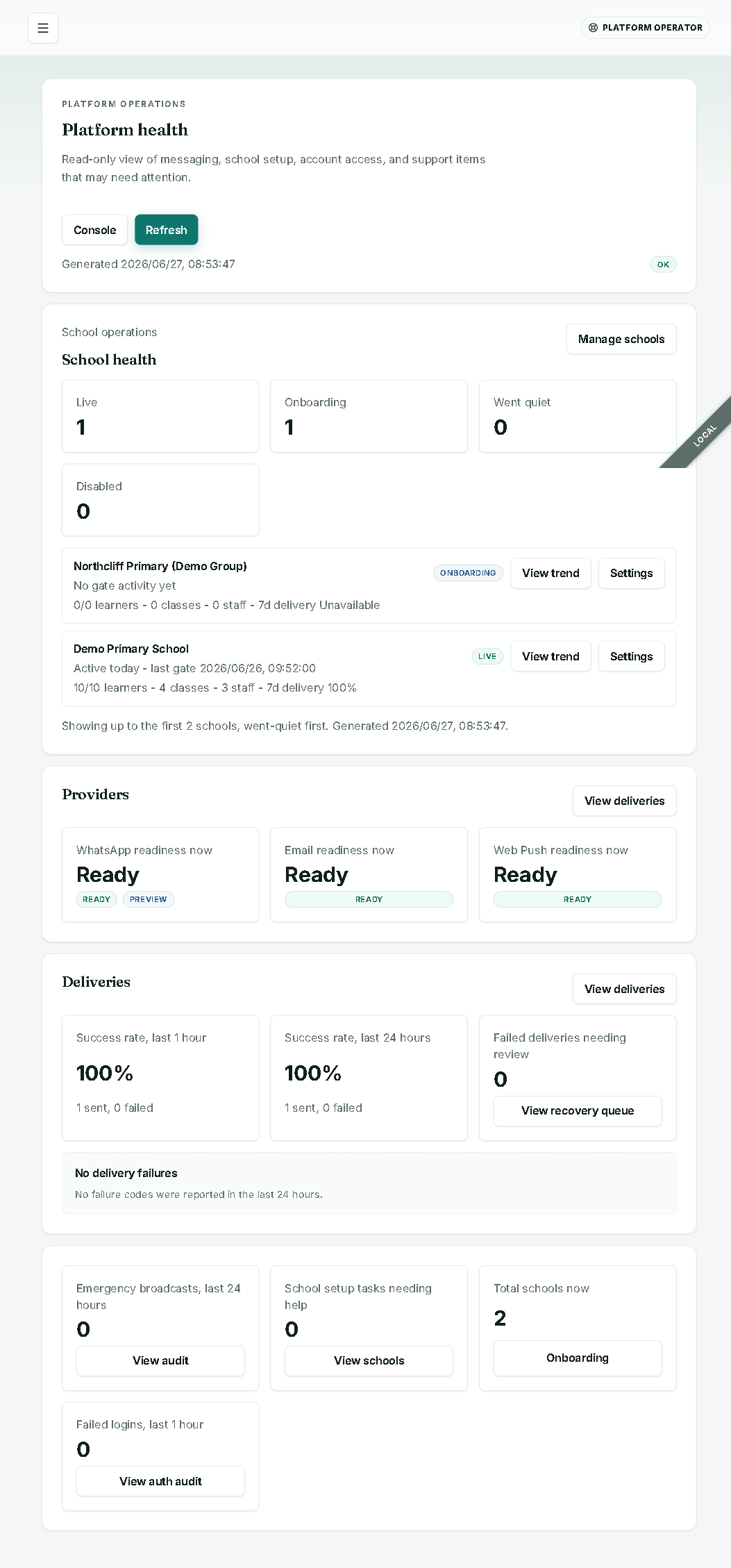
- From the console, open Health console.
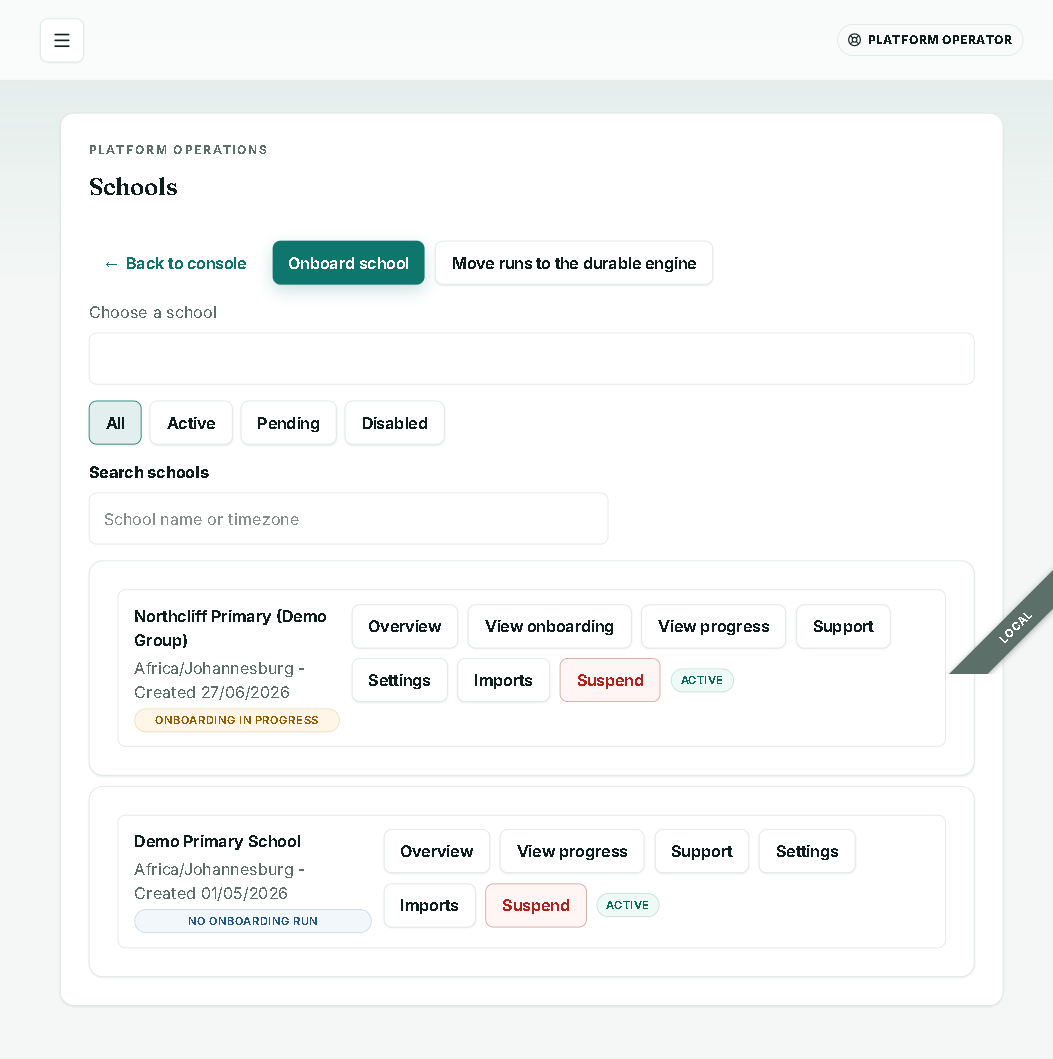
- Walk the Platform health numbers and the School onboarding list (filters All / Active / Pending / Disabled).
- Show Provider readiness (WhatsApp / Email Ready) and note per-school actions on the Schools list: Overview / View onboarding / View progress / Support / Settings / Imports / Suspend.
- Honesty beat: “Health overview is bound to
shard_0today and caps at the current fleet size — shard-ready, single-shard today.”
Beat 4 — Drop into one campus as admin
“Now the daily reality for a principal.”
- Log in as
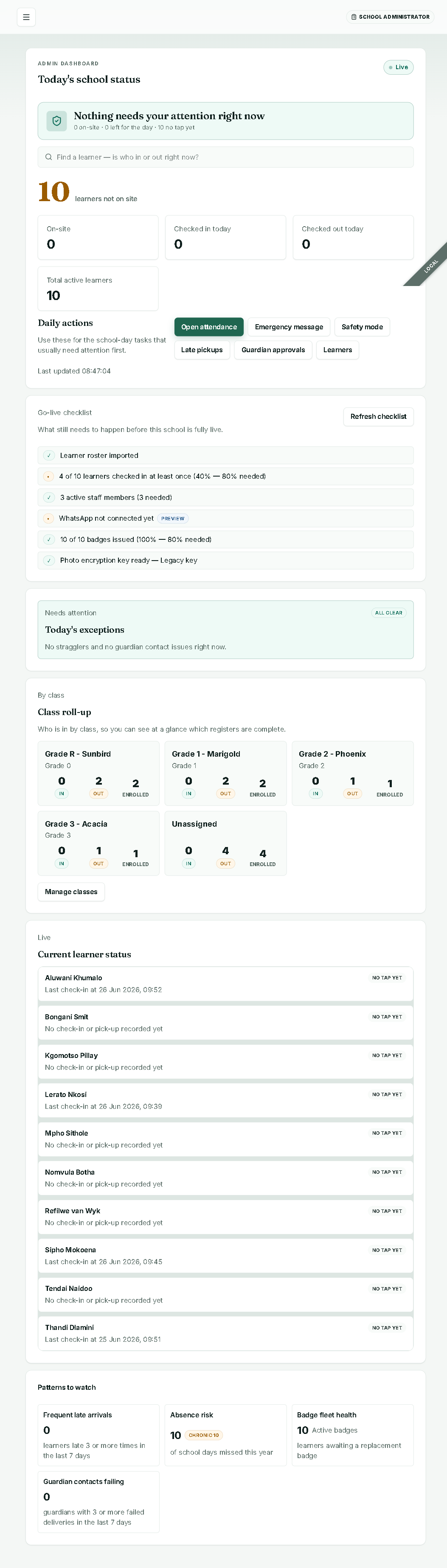
admin@example.com. Expect a passkey step-up if a passkey is enrolled — this is real security, not a glitch. (If you need the password path, you may have to clear a stale credential first; rehearse this.) - Land on the Dashboard: read “Today’s school status” (Live), the answer-first line (“Nothing needs your attention right now · N on-site · N left for the day · N no tap yet”), and the tiles On-site / Checked in today / Checked out today / Total active learners.
- Show the Go-live checklist (Learner roster imported / X of Y checked in / active staff / WhatsApp not connected yet [Preview] / badges issued / Photo encryption key ready) — this is your honest readiness story in one widget.
- Point at Class roll-up, Current learner status, and Patterns to watch (Frequent late arrivals, Absence risk, Badge fleet health, Guardian contacts failing).
- Leave this tab open — you’ll watch a count update live in Beat 5.
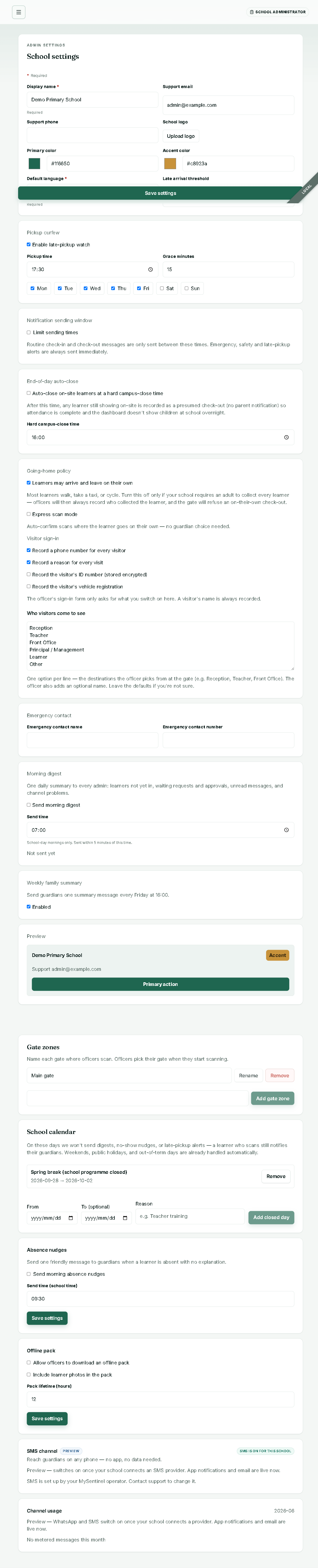
Optionally show Settings depth (display name, primary colour #1f6650 / accent #c8923a, default language English/Afrikaans/isiZulu, late-arrival threshold, pickup curfew, quiet hours, going-home policy + Express scan mode, visitor sign-in fields, gate zones, school calendar, channel usage metering).
Beat 5 — The gate, on the Android phone (the hero flow)
“This is what happens 600 times a morning.”
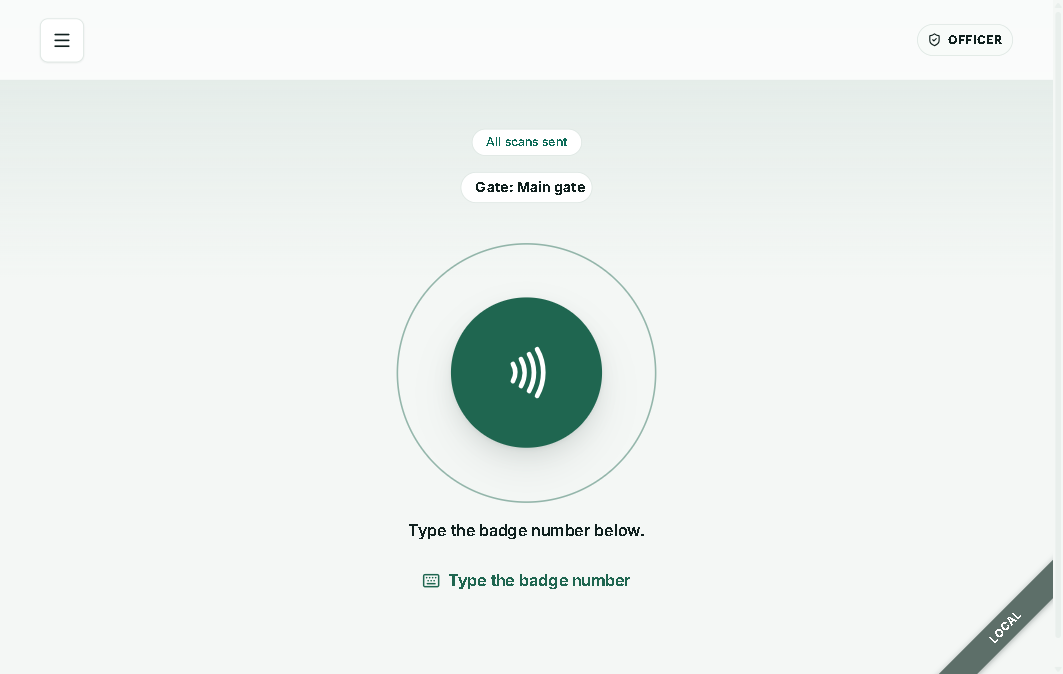
- On the physical Android phone, log in as the officer and open Gate (Field nav: Gate, Check tag, Visitors, Waiting to send, Offline pack). The screen reads “Scan a learner’s badge”, status “All scans sent”, “Gate: Main gate”.
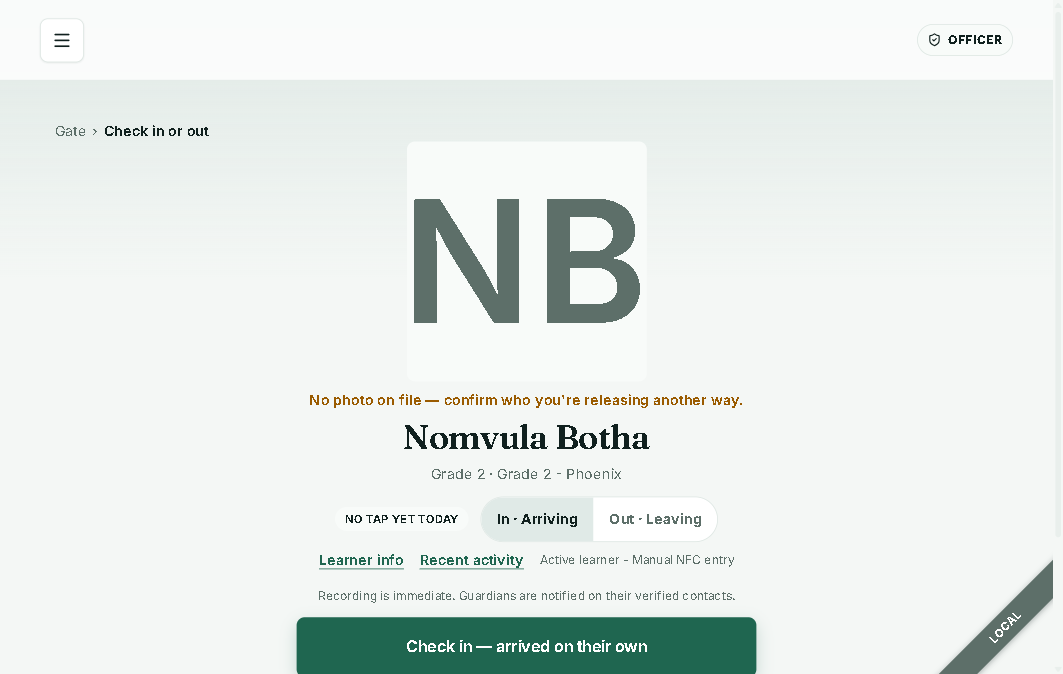
- Tap a registered badge. You land on the decision screen (
/guardians): learner name + photo-or-initials (if no photo: “No photo on file — confirm who you’re releasing another way.”), the scan-first toggle In · Arriving / Out · Leaving, and the line “Recording is immediate. Guardians are notified on their verified contacts.” - Choose the release: “Check in — arrived on their own” or “Dropped off by a guardian (N)” — this is the guardian-optional model; call it out.
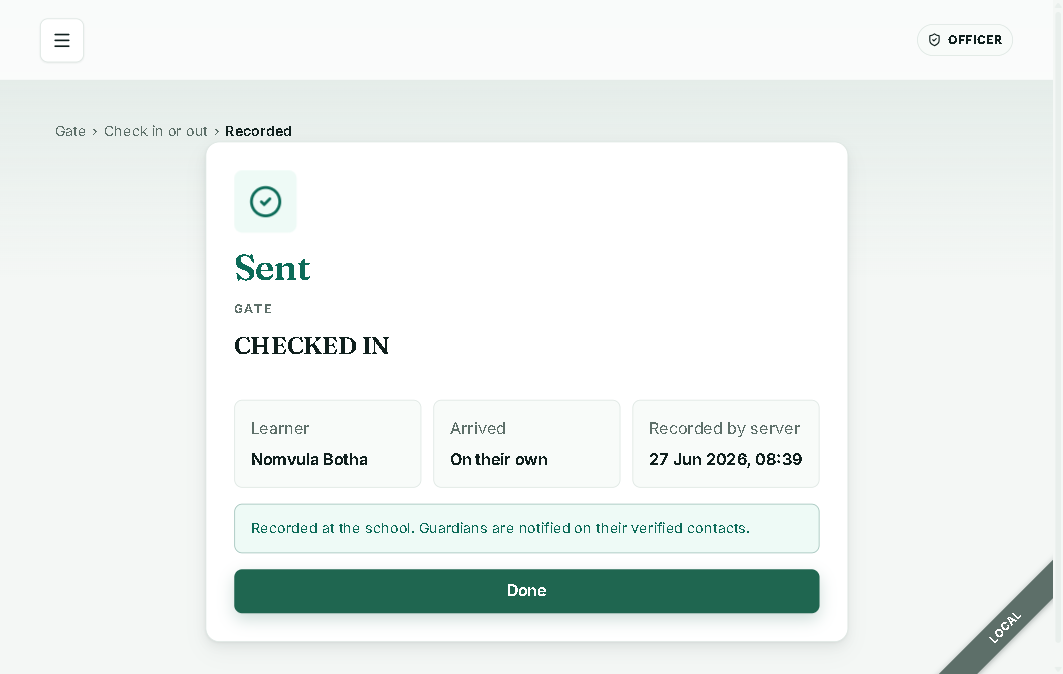
- Confirm screen (
/confirm): “Sent” badge, “CHECKED IN” heading, “Recorded by server” , status “Recorded at the school. Guardians are notified on their verified contacts.” Tap Done. - Switch to the admin dashboard tab — the count updates live (SSE) within about a second. That’s the real-time spine.
Optional resilience flourish (only if rehearsed): throttle the phone offline, scan → expect amber “Queued”, restore connectivity → it flips to “Sent.” Green = confirmed, amber = queued — the contract is unmistakable. If you haven’t rehearsed it on UAT, skip it rather than risk a stuck state live.
Beat 6 — The guardian side
“What every parent sees — no app store, no login.”
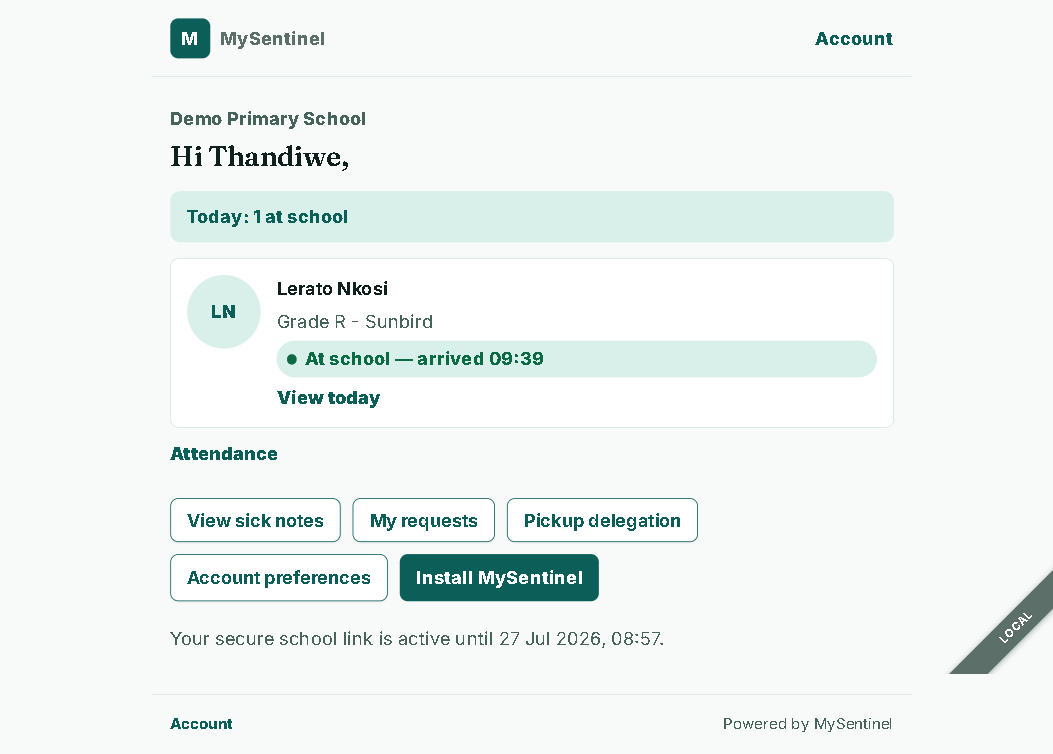
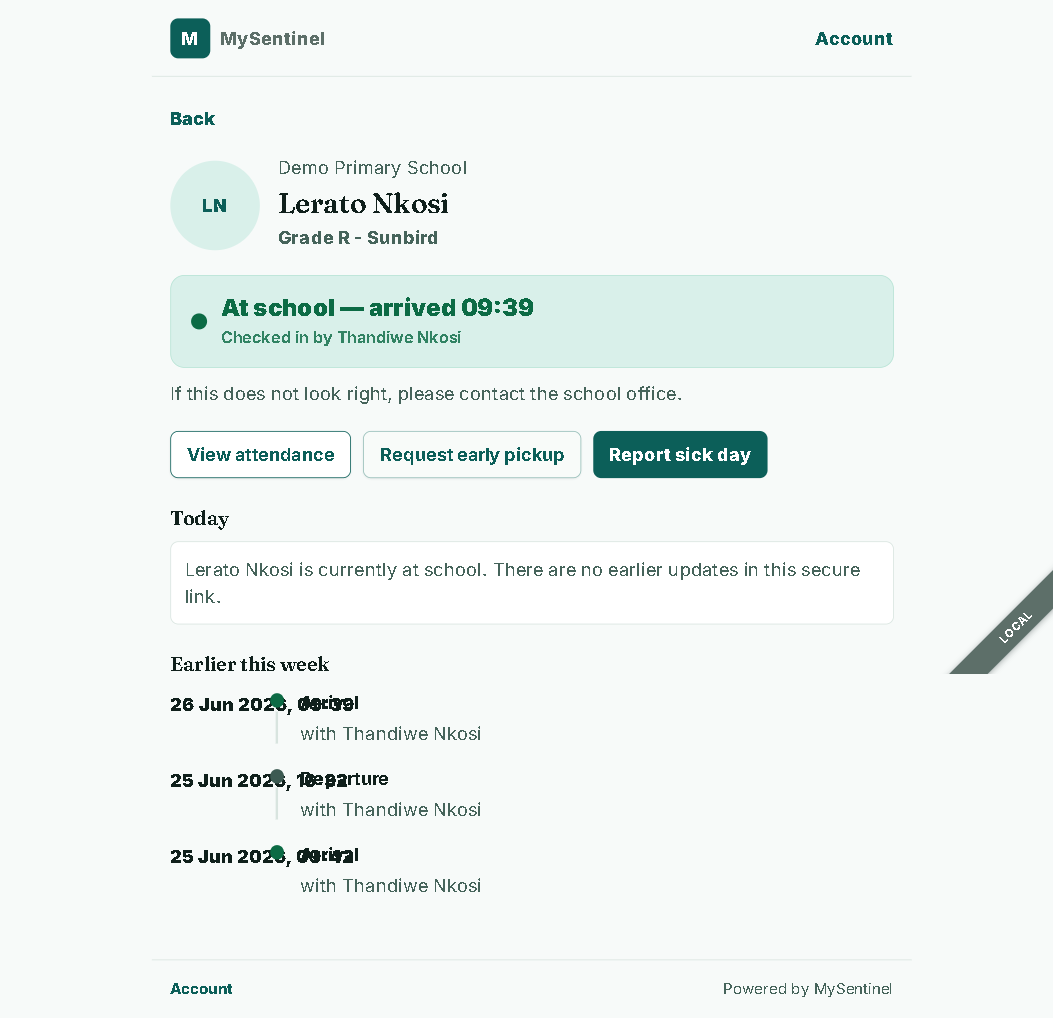
- On a phone, open the tokenised
/p/[token]link cold. No login. - Show the header “Parent portal” + Account, “Hi
,” , “Today: N at school”, and the linked learner’s real-time status (e.g. “At school — arrived 09:39”). - Walk the actions: View today / Attendance / View sick notes / My requests / Pickup delegation / Account preferences / Install MySentinel.
- Point at “Your secure school link is active until
,” and the footer “Powered by MySentinel.” - If §1.3 is proven: tap Install MySentinel and show a real push arrive. If not: name push as Roadmap for this environment and show the channel-honesty UI instead.
Beat 7 — Class teacher + trust/compliance
“Scoped access for staff, and isolation you can verify.”
- Log in as
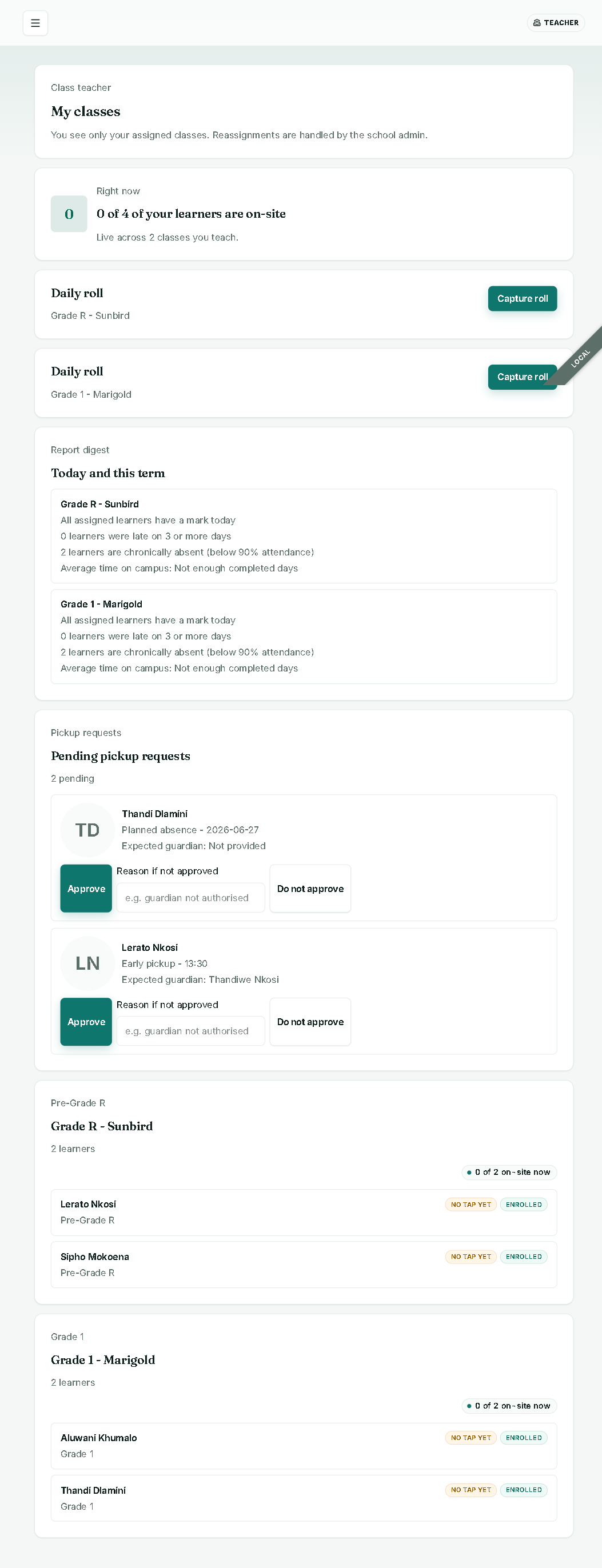
mrs.naidoo@example.comand open/class-teacher. Show “My classes”, the note “You see only your assigned classes. Reassignments are handled by the school admin.”, the on-site line, the Daily roll (Capture roll), the Report digest (today + term: marks, late 3+ days, chronically absent, average time on campus), and Pending pickup requests (Approve / Do not approve + reason). - Prove isolation live: as the officer, navigate to
/admin→ you’re bounced to the gate. As admin, navigate to/operator→ you’re bounced to the admin home.school_idcomes from the token only — campus A cannot see campus B. - Passkey step-up already showed itself in Beat 4; restate that sensitive admin actions require it.
- Compliance: mention POPIA SAR/erasure backed by the append-only audit trail (DB-trigger-enforced). Only open a branded SAR/PDF if §1.4 is confirmed.
Beat 8 — Commercial close
“And the honesty is the product.”
- Pricing: ~R10 per learner per month (negotiable), billing is manual / out-of-app, channel costs are BYO or marked-up pass-through. Point at the channel usage metering in admin Settings as the basis.
- Show the roadmap slide plainly: group-scoped owner tenant, physical multi-shard scale, bulk multi-campus onboarding, and a consolidated cross-campus academic report. (Channels — push / WhatsApp / SMS — are done and tested; keep them off the roadmap slide.)
- Close on the pilot path: 2–3 schools in the group on UAT today → per-learner billing report → land the group → build the group-scoped owner tenant for the next, larger group.
4. If X breaks, say Y / fallback
Stay calm, narrate honestly, and move to the fallback. A composed recovery reinforces the “we don’t fake it” message.
| If this breaks | Likely cause | Say this | Fallback |
|---|---|---|---|
| NFC tap opens manual entry, not the decision screen | Not on Chrome-Android / not HTTPS / tag unregistered | ”Web NFC is Android-Chrome only — on other devices it falls back to typing the badge, which is the same flow.” | Use “Type the badge number” manual fallback on the Gate screen; the rest of the flow is identical. |
| Web push doesn’t arrive on the phone | Device not subscribed / notifications blocked on the handset | ”Push is confirmed on our test device — this handset just isn’t subscribed. App notifications and email are delivering regardless.” | Re-subscribe the device, or show the channel-honesty UI and the email path. |
| WhatsApp doesn’t deliver for a school | That school hasn’t connected its provider yet | ”WhatsApp delivers — it activates per school once the provider is connected, and until then we honestly demote to email rather than fake a send.” | Show the email delivery and the [Preview] badge on that school’s go-live checklist. |
| PDF / SAR renders title-only | Browser Rendering binding missing | ”Branded PDF rendering needs our Browser Rendering binding switched on for this environment.” | Don’t open it live; describe it, mark Roadmap for this env. |
| Admin login won’t reach a password screen | Passkey step-up enrolled / stale credential | ”That’s our passkey step-up working — sensitive logins require it.” | Use the passkey path you registered, or the pre-cleared password path you rehearsed. |
| Buyer asks to “see production” | Prod is a hollow shell, no secrets, usage-blocked | ”Production is provisioned but not yet carrying live traffic — UAT is the honest place to evaluate.” | Stay on UAT. |
| Buyer asks to log in as “the group owner” | No group-scoped tenant yet | ”That role — owner scoped to just your campuses — is on the near roadmap. Today this is the platform operator view, and this platform holds only your schools.” | Demo the operator console with only the buyer’s schools present. |
| Buyer asks “does each school have its own database?” | Single live shard | ”Shard-ready, single-shard today — isolated logically by school_id, with the physical-sharding code already written.” | Move to the tenant-isolation live proof (campus A can’t see campus B). |
| Report builder returns empty/error | Free-text “Class ID” mismatch (known crack) | “We’re mid-migration from a free-text class field to a dropdown.” | Avoid the report builder live; use the admin dashboard’s class roll-up and the class-teacher report digest instead. |
| Attendance page is all English in a trilingual demo | Page hardcoded English (known crack) | “That one screen is still being localised.” | Prove trilingual via Settings → default language and the parent portal language switch (Use school default / English / Afrikaans / isiZulu). |
| Dashboard count doesn’t update after a scan | SSE/projection lag | ”Let me give the live stream a second.” | Refresh once; the projection catches up. If still flat, narrate the recorded-vs-projected split honestly and move on. |
| Onboarding workflow step stalls | Transient backend hiccup | ”The workflow is durable — it retries with backoff, so it self-heals.” | Wait it out, or open View onboarding to show the step state; the durability is itself the point. |
Quick reference
- Demo on UAT only. Production is a hollow shell.
- Logins (password
password123):operator@example.com,admin@example.com,mrs.naidoo@example.com,officer@example.com. - Channels (all confirmed on UAT): app notifications, email, web push, WhatsApp, SMS. WhatsApp/SMS still activate per school once that school connects its provider.
- Brand: primary teal
#1f6650, gold accent#c8923a. Colours mean: red = emergency only, green = confirmed, amber = queued / at-risk. - Terminology: Learner (not Student), check in / check out (not movement), guardian (not parent) — though the product surface is the “parent portal.”
- The throughline: name what’s live, what’s a provisioning step, and what’s roadmap — the honesty closes the deal.